 Home
HomeiTunes® Playlist Export
Name
 iTunesPlaylistExport.exe version 0.99.4,
last updated 12/4/2012
Features
- Command-line utility to export iTunes® playlists to Windows® Media Player Playlists as well as the M3U/M3U8 playlist format (Winamp/MP3)
- Export all or some playlists - pass playlist names in via the command line or via a separate file
- Exclude specific song file formats (i.e. protected M4P)
- Optionally shuffle songs on export
- Optionally copy song files to separate folder for importing into another media library
- Optionally converts absolute file paths to relative paths
- It's a command line utility, so it can be scheduled to run in the task scheduler
Requirements
- Microsoft.NET framework v2.0
- Operating Systems: Tested on Windows XP, Windows 7 & Windows 8; should be fine on Vista
- RAM: maybe 20MB available for a library with 2000 songs
- Disk space: 80KB for the program itself, plus additional space for any exported playlists/songs
- License terms: freeware
Screenshot
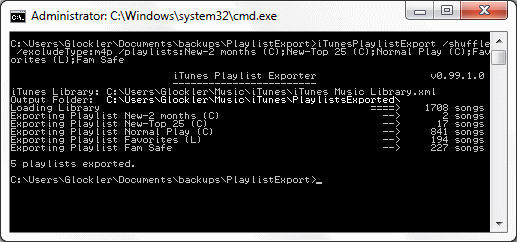
Command Line Parameters
| /IN | pass in the location of the iTunes® playlist library. example: /IN:c:\Music\iTunes\myLibrary.xml if this argument is omitted, the playlist is assumed to be in the current user's Music folder under \iTunes\iTunes Music Library.xml |
| /OUT | The folder to save playlists to. example: /out:PlaylistsExported if this argument is omitted, the playlist is assumed to be in the current user's Music folder under \iTunes\PlaylistsExported |
| /SHUFFLE | Shuffle the songs in the playlist. By default, playlists are shuffled 4 times, but if you want to customize, use /SHUFFLE:7 to shuffle 7 times |
| /PLAYLISTS | Pass the playlist names to export. This argument accepts a list of playlists separated by semi-colons or a
filename containing one playlist name per line.
Example: /PLAYLISTS:New-Top 25;Family Safe;Dance Music Example: /PLAYLISTS:@Playlists.txt |
| /STARS:n | Optionally include only songs with a specific star rating. Multiple stars can be separated by a semi-colon /STARS:0;5 includes songs with 0 and 5 stars |
| /CHECKED | Optionally include only songs that are checked |
| /RELATIVE | Converts song filename paths from c:\Users\MyName\Music\iTunes\iTunes Music\artist\album\song.m4a
to something relative to the /OUT folder, usually ..\iTunes Music\artist\album\song.m4a |
| /REPLACE | replaces text at the beginning of filepaths. This is helpful if you're working with a backup
of the iTunes folder and the /relative switch won't work.
The following example will replace c:\Users\MyName\Music\iTunes\ with ..\ /REPLACE:c:\Users\MyName\Music\iTunes\*..\ |
| /COPY | Copies the music to the Music\ subfolder of the /OUT folder. The progress updates every 5 songs. |
| /SYNC[:logfile] | Deletes songs in the output music subfolder that were not referenced in any of the playlists exported during the current program execution. Empty folders are deleted as well /SYNC will just delete, but if you use this switch like /SYNC:logfile.txt then a log file will be created in the program's folder with a list of all deleted files |
| /EXCLUDETYPE | a list of song file extensions separated by a semi-colon. The protected songs can be omitted by
using this switch. Example: /ExcludeType:M4P |
| /FORMAT | The format of playlist to create: /FORMAT:WPL Windows Media Player Playlist /FORMAT:M3U MP3/WinAmp /FORMAT:M3UE MP3/WinAmp (extended) /FORMAT:M3U8 MP3/WinAmp /FORMAT:M3U8E MP3/WinAmp (extended) /FORMAT:COPYONLY Don't create playlist files, just copy files |
| /NOWARN | Suppresses warning messages |
| /Q | Quiet output. Only displays the number of exported playlists, /COPY file progress, errors, and mandatory questions |
| /INFO | More detailed info about what the program does behind the scenes |
Why did I write this?
When I got a new blu-ray player, I didn't know what
DLNA was,
and it wasn't until I finally got a new computer that all of a sudden I saw my computer's music
library on the blu-ray player. Once I set up a junction file, I was able to browse a backup copy
of our laptop's iTunes library. Browsing the whole library was cumbersome, so I started looking
for tools to export the iTunes playlist. Maybe I didn't look hard enough, but I didn't find
anything that did exactly what I wanted it to do. So, I started looking for a free compiler to
write my own program. I didn't realize that the .net framework came with a free compiler, so i
was happy about that.
Once I started it, I got to thinking that other people could be in the same boat. Here we are.
I hope this program does everything you need it to do.